Issue Explorer
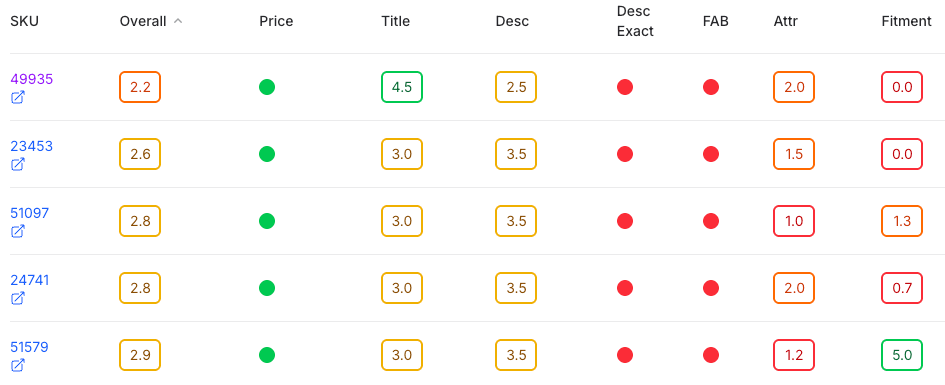
Sort, filter, tag, share and fix. Every finding from every audited page, in one view.
What’s in the audit
For every SKU, TVA reads these data points on the live page and compares each one with your ACES and PIES.
There are more than 100 ways to sort, filter and explore the results.
| Item | Data point | What TVA asks |
|---|---|---|
| 1 | Title | Is the title accurate, and close to the manufacturer’s suggested title? |
| 2 | Description | Is a description there, correct and meaningful, and close to the manufacturer’s? |
| 3 | Features & benefits | Does the listing carry the features and benefits in the manufacturer’s PIES? |
| 4 | Price | The price on the page, audited and monitored. |
| 5 | MAP | Where the price sits against the minimum advertised price. |
| 6 | Attributes | Does the page show the right attributes, such as size, finish and features? |
| 7 | Missing fitment | Is every make and model listed? TVA shows the ones that aren’t. |
| 8 | Extra fitment | Are makes and models listed that don’t fit? TVA shows them. |
| 9 | Primary image | Does the primary image show the correct product? |
| 10 | Video | Are the product videos on the page? |
| 11 | Asset count | How many media assets the page shows. |
| 12 | Shipping | Does the page show the part can ship to the shopper? |
| 13 | Category | Filter every result by product category. |
Reports you’ll actually read
- Clear reportsNo more spreadsheets. Easy-to-read reports put what’s worth fixing at the top.
- Powered by AITVA compares pages with ACES and PIES data quickly and precisely, at scale.
- Quick to useCategorized, sortable, filterable views, plus ready-made reports to share.
Book a test drive
See TVA working on your own data. Book a demo, or send us up to 100 SKUs and we’ll check them for free.